
How to Use All Aboard Deals to Track Cruise Prices
Set up deal scores, price alerts, and weekly reports in under 5 minutes. Free account walkthrough for the web app and Chrome extension.

You signed up. Now what?
This is the practical guide — what you can actually do with a free All Aboard Deals account, how to set it up, and how to use it to stop guessing whether a cruise price is good.
Everything here works on the web app at allaboarddeals.com. If you also want deal scores overlaid directly on cruise line websites while you browse, there's a free Chrome extension called Cruise Radar that does that too. Both connect to the same account.
What You Get With a Free Account
Before we get into the how — here's the what.
- Deal scores on 22,500+ sailings across 8 cruise lines
- 12-month price history on the web app
- Up to 2 price drop alerts — we email you when a sailing you're watching drops in price
- 2 weekly emails — Friday deals newsletter + Monday market report
- Chrome extension with deal scores overlaid on cruise line sites while you browse
All of this is free. No credit card, no trial period.
Step 1 - Set Up Your Account
If you signed up with Google, you're already in. If you signed up with email, check your inbox for the account setup link — it lets you create a password so you can log in on any device.
Once you're logged in, you're ready to go. Your account page is where you manage your email, password, and subscription status.
Step 2 - Browse Deals on the Web App
The deals page is where everything lives. Only sailings scoring 75 or higher show up here — if it's on the page, it's a real deal. Prices update multiple times per day.
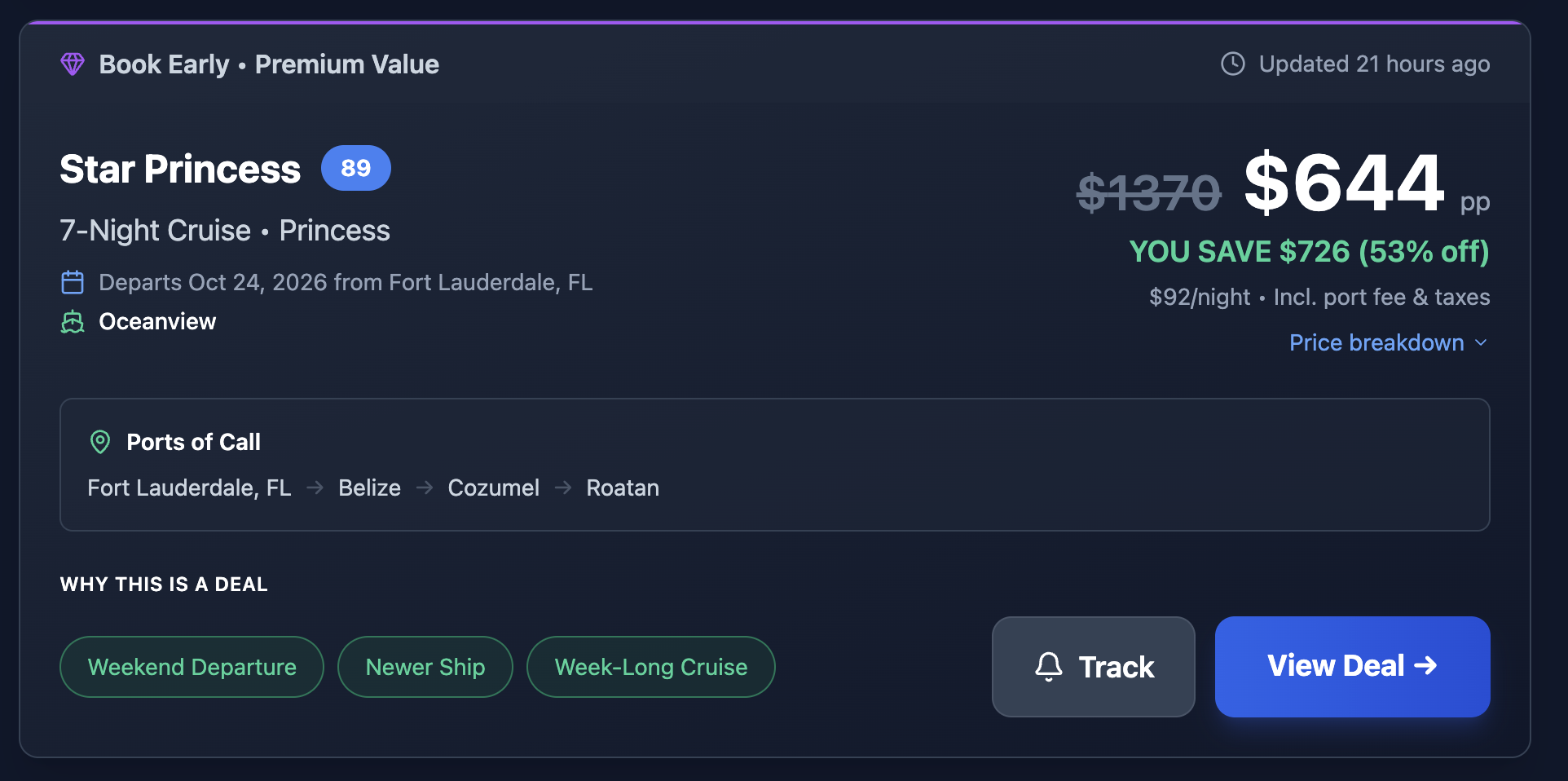
What you're looking at
Each deal card shows:
- Deal score (0-100) — how good this price is vs. what this ship normally costs
- Ship, cruise line, and cabin type
- Departure date, nights, and embark port
- Price per person with savings vs. historical average
- Price per night including port fees and taxes
- Ports of call — full itinerary route
- "Why This Is a Deal" tags — factors like Newer Ship or Weekend Departure
- Track — add to your watchlist for price drop alerts
- View Deal — click through to the cruise line to book
The score compares today's price to historical data for that exact ship — not averages across a fleet or cruise line. Symphony of the Seas is compared to Symphony of the Seas.
- 90-100: Genuinely rare price. These don't last and they don't come around often.
- 75-89: Solid deal. Price is meaningfully below what this ship normally runs.
Filtering
The filter panel on the left side lets you narrow by deal score, cruise line, cabin type, departure port, destination region, sailing window, and sort order.
Clicking through
We don't sell cruises. When you find a deal worth booking, click through to the cruise line's website to book directly. The deal card links straight to the sailing on the source site.
Step 3 - Set Up Price Drop Alerts
Found a sailing you're considering but not ready to book? Add it to your watchlist and we'll email you when the price drops.
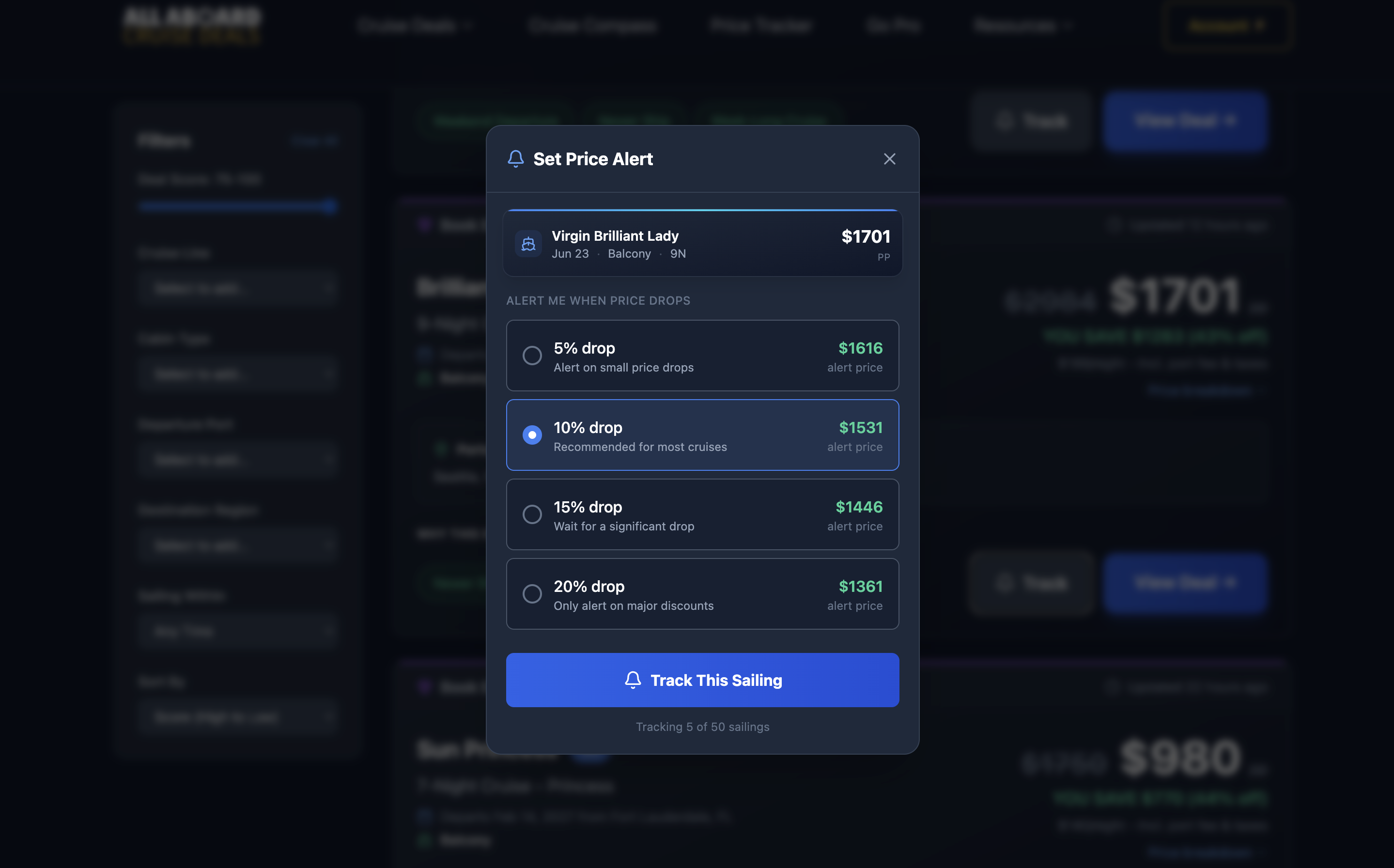
Three ways to track a sailing
- From the deals page — click the Track button on any deal card
- From your watchlist — go to your account page, click the Watchlist tab, and use + Add Cruise to search by ship name, cruise line, or departure window
- From the Chrome extension — click "Track This Sailing" on any cruise line site where Cruise Radar is active
All three sync to the same account and the same watchlist.
Choose your alert threshold
When you add a sailing, you pick how much of a price drop triggers an alert — 5%, 10%, 15%, or 20%. We check prices multiple times per day and email you when it hits your target.
Free accounts track up to 2 sailings
Choose the ones you're seriously considering — not sailings you're casually browsing. You can remove a sailing from your watchlist anytime to free up a slot. Pro gives you unlimited tracking.
- Sailings you'd actually book — real trips, not aspirational browsing
- Departing 2-6 months out — enough time for prices to move
- Different dates, same itinerary — prices vary week to week
We track cruise prices across 190+ ships
Free Monday + Friday emails — market reports, price drops, and where the deals are.
Step 4 - Use the Chrome Extension (Optional)
The web app gives you everything above. The Chrome extension adds one thing: deal scores and price history overlaid directly on cruise line websites while you browse.
Instead of checking the deals page separately, you see scores as you shop on Royal Caribbean, Norwegian, Celebrity, MSC, and others.
What it shows
- A deal score badge on each sailing as you browse
- A 90-day price history chart when you click into a sailing (12 months with Pro)
- The ability to track sailings for price drop alerts without leaving the cruise line site
For a full walkthrough with screenshots, see the Cruise Radar complete guide.
Step 5 - Read the Weekly Newsletter
Two emails hit your inbox each week:
Friday — Top Deals
The best-scored sailings across all lines. Every deal scores 75 or higher. We don't pad the list with mediocre deals to fill space. If it's a quiet week, we say so.
Monday — Market Report
A short read on what's happening with cruise prices — which lines are moving, notable pricing trends, and anything worth watching that week.
If either email isn't showing up, check your spam folder and add hello@allaboarddeals.com to your contacts.
What to Do When You Find a Good Deal
You see a sailing scoring 92. Now what?
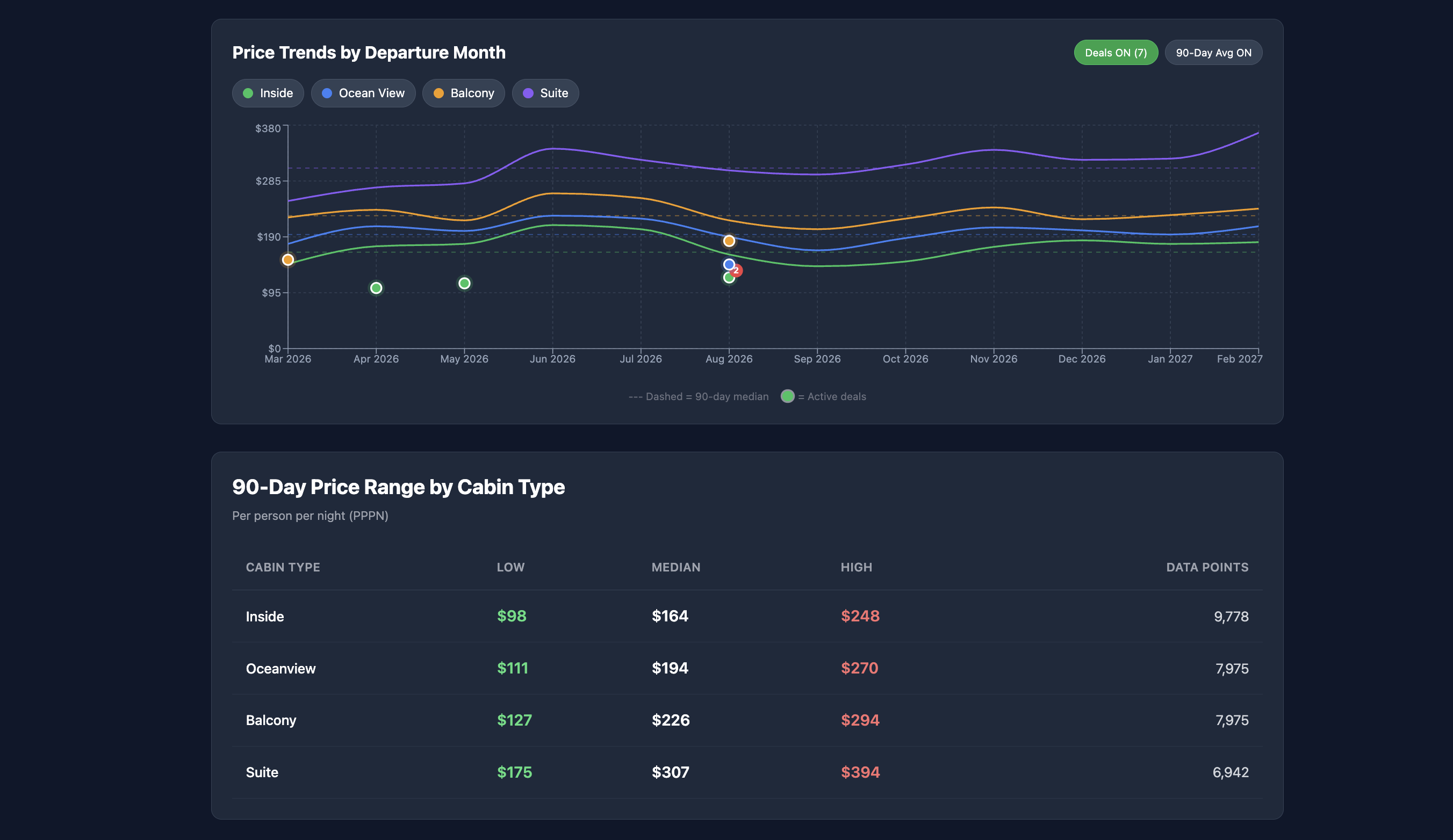
- Check the price history — click into the ship page to see 12 months of pricing data. Is this an all-time low, or has it been this cheap before?
- Check the departure date — how far out is it? Last-minute deals (under 30 days) may have limited cabin inventory.
- Check the cabin type — a 95-score inside cabin is a different decision than a 95-score balcony. Both are great prices relative to history, but make sure it's the cabin type you actually want.
- Click through and verify — prices on our end update multiple times daily, but always confirm the current price on the cruise line's site before booking.
- Book if it works for you — high scores don't mean you need to drop everything and book. They mean the price is unusually good relative to what this ship normally costs. If the dates work and the price works, you have data-backed confidence that you're not overpaying.
What Free Doesn't Include
Free covers most of what you need to shop smarter. But there are things it doesn't do:
- No "Book Now or Wait" predictions — Pro analyzes pricing patterns to tell you whether a price is likely to drop further or if you should lock it in
- No rebook fare alerts — if you've already booked a cruise and the price drops, Pro watches it for you and tells you when to call the cruise line for a price adjustment
- No Cruise Planner package tracking — Pro monitors drink, WiFi, and dining package prices on Royal Caribbean and Celebrity
- 2-sailing tracking limit — Pro gives you unlimited
- 12-month price history in the extension — free extension shows 90 days, Pro shows the full 12 months
If you're actively booking and want the full picture, here's what Pro includes. But the free account on its own gives you more cruise pricing data than any other tool out there.
Quick Start Checklist
If you just want to get going:
- Set your deal preferences (cruise lines, regions, cabin types)
- Browse the deals page and sort by score
- Track 1-2 sailings you're actually considering
- Read Friday's newsletter when it hits your inbox
- When a score 90+ deal matches your plans — click through and book with confidence
That's it. No tricks. No pressure. Just data that tells you whether a cruise price is actually good, so you don't find out the hard way that it wasn't.
If you want the Chrome extension too, install Cruise Radar here — it takes 30 seconds and works alongside everything above.
 A daily cruise trivia game
Graham H — Founder, All Aboard Deals
Graham has been cruising for over a decade and has sailed on 15+ cruises across Royal Caribbean, Carnival, Norwegian, and Virgin.
He built All Aboard Deals to track cruise prices the same way traders track charts, monitoring 32,500+ sailings and spotting fares that fall well below their recent averages.
Editorial Standards
All guides are based on real pricing data, live fare checks, and historical trends. Content is updated as ships launch and prices change. Questions or corrections? Contact us